What it does
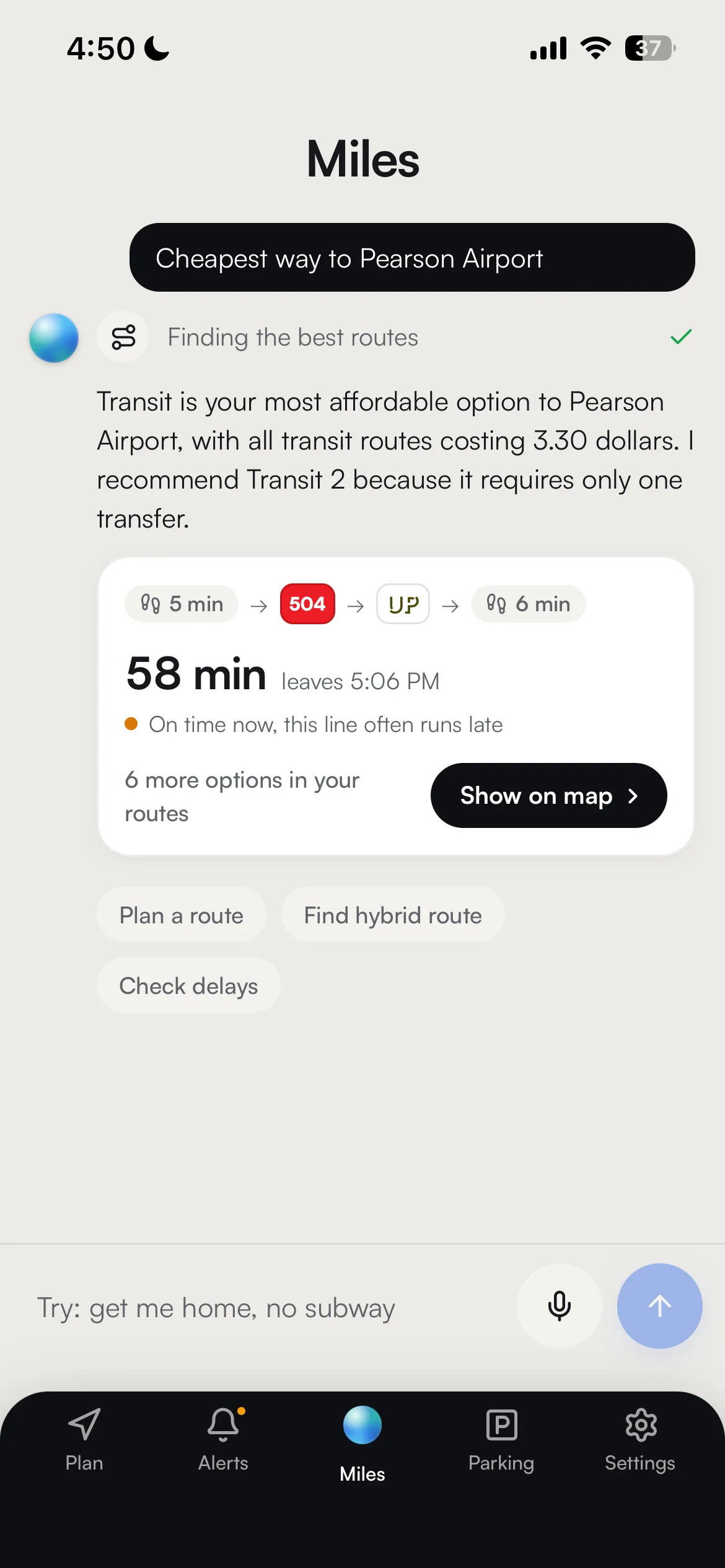
Miles is the assistant built into Reroute. You ask a question the way you would ask a person, "cheapest way to Pearson at 5", and Miles answers in a couple of sentences and puts the trip it means on the map as a route you can tap.
It is not a chatbot bolted onto a maps app. Miles runs the same route engine, the same live alerts and the same delay history the rest of the app runs, so the trip it recommends is a real trip you could have planned yourself, not a description of one.
It is also allowed to say it does not know. Miles is required to look up service status before claiming a line is running, which is the difference between an assistant and an autocomplete.
How it works
Open the bar at the bottom of the map, or press Command K or Ctrl K, and type. You can also tap the mic and say it.
Miles reads your question and decides what it needs to find out. Sometimes that is one lookup, sometimes several: plan the trip, check the delay history on the line it wants to use, scan live alerts, look at the weather, check whether anything is actually leaving that station soon. You watch each lookup happen as a chip, so the wait is legible rather than a spinner.
Then it answers, short, with the trade-off named, and the route it chose is drawn on the map with follow-up suggestions underneath. If the answer needs a different trip you can just say so, and Miles keeps the constraint for the rest of the conversation.


What Miles is allowed to look up
Miles has no private knowledge of the network and is not trusted to remember one. Everything it asserts about service, times or price comes from a lookup it made while answering you, and this is the whole list of what it can reach for.
- Plan the trip
Runs the real route engine for your start and end, in whatever modes you are still allowing, and hands back the same ranked options the app would.
- Check what is broken right now
Live disruptions, which it is required to do before saying a word about whether a line is running.
- Read a line's track record
How often that line runs into trouble at that hour, in that weather, against a typical trip. Reported in words, never as a figure for your trip.
- Check something is actually leaving
The next departures from a named station, so a late-night or weekend answer is grounded in the timetable rather than in confidence.
- Find stations with parking
Stations near you that have a lot, with its rate and how big it is, rather than an assumption that a station must have one.
- Pick the best park and ride
One vetted answer for a specific trip, weighed against traffic, parking, the hour and whatever is disrupted.
- Look at the weather
Because it decides whether walking is a real option, and it feeds the delay read either way.
If none of these can answer, Miles says so. It is not allowed to fall back on what it happens to remember about the network.
Make it yours
Every setting below is named exactly as the app names it, with where to find it. None of it needs an account.
- Clear conversationThe Miles card, top right
- Starts over. Constraints you stated go with it, which is the fastest way out of a conversation that has narrowed itself into a corner.
- Trip preferencesSettings → Trip preferences
- Sorting, agencies, modes and the walk and transfer limits shape the routes the app plans for you. A constraint you say to Miles applies to that conversation; a preference you set here applies to everything.
- FaresSettings → Fares
- Your rider category and how you pay. Ask Miles for the cheapest way somewhere and this is what "cheapest" is measured against.
Miles is deliberately thin on settings. It is a way of asking, so most of what it can do for you is set by telling it, and the rest is set once in the app.
Get more out of it
- Give it the constraint, not the workaround
"I cannot do stairs", "no subway", "transit only": say it in the question, right in the Miles bar at the bottom of the map, and it gets you further than picking a station yourself. Each answer's routes are filtered by the constraint you stated, and if a later answer ever drifts from it, just say it again.
- Ask it what it would do, not just how to get there
"Is it worth driving to a station right now" is the kind of question Miles is actually for. It has the traffic, the parking, the service status and the schedule in one place, which is the comparison nobody wants to do by hand.
- Use it as a delay check
Ask about a line at a time of day and Miles reads the history for that line, at that hour, in that weather, and answers in words rather than a number. It will not invent a figure for a line the history does not cover.
- Command K or Ctrl K, then talk
The keyboard shortcut opens the bar from anywhere in the app, and the mic is beside the send button. Standing on a platform, saying where you want to go beats typing an address twice.
- Tap the route it drew
The answer is the short version. The route on the map opens into the full timeline, with the live legs, the fare breakdown and the leave cue, exactly as if you had planned it.
Good to know
- It answers short on purpose
Miles is scoped to a couple of sentences. It is meant to end with you looking at a route, not reading an essay about routes, and a long answer on a phone at a stop is a worse answer.
- It will not claim a line is fine without checking
Miles is forbidden from asserting that a line is open, closed or on schedule from memory, and forbidden from recommending a line with an active closure. If the check fails it says so rather than guessing.
- It never gives you a percentage for your trip
Delay history says how often a line runs into trouble compared with a typical trip, and how bad it tends to be once it has. Miles reports that qualitatively, and a line the history does not cover is named as uncovered rather than given a neighbour's numbers.
- If the assistant is unavailable, the app is not
When the assistant cannot be reached you get a plain message and a way back to the planner, not an error screen. Everything else in Reroute keeps working.
Under the hood
Miles is a Google Gemini model with a tool loop around it. It cannot answer from memory about anything operational: routing, delay risk, live alerts, weather, park and ride station discovery and station schedules are function calls into the same backend the app itself uses, and the answer is assembled after they return. The streaming version emits each call as an event, which is what the chips on screen are.
The route half is literally the same engine. Miles calls the route generator with the shared application state, so the itineraries it recommends carry the same MOTIS transit legs, the same Mapbox drive legs, the same fare breakdown and the same delay read as anything you plan by hand.
Mode restrictions are enforced server side rather than by prose. A stated constraint is turned into a real preference object and a trimmed mode list before the engine runs, and the engine's usual habit of relaxing an over-narrow filter is switched off while a restriction is active, so an excluded mode cannot quietly reappear.
Alert text and other third-party strings are marked as untrusted data in the prompt rather than treated as instructions, and tool errors are returned to the model as a generic failure rather than echoed verbatim. Both exist to stop a feed becoming a way to talk to the assistant.
Frequently asked questions
Is Miles making the routes up?
Does it remember what I told it?
Can I use it hands free?
Will it tell me the chance my train is late?
One app for the whole trip.
Every way across the GTA, ranked in one list. No account needed.